
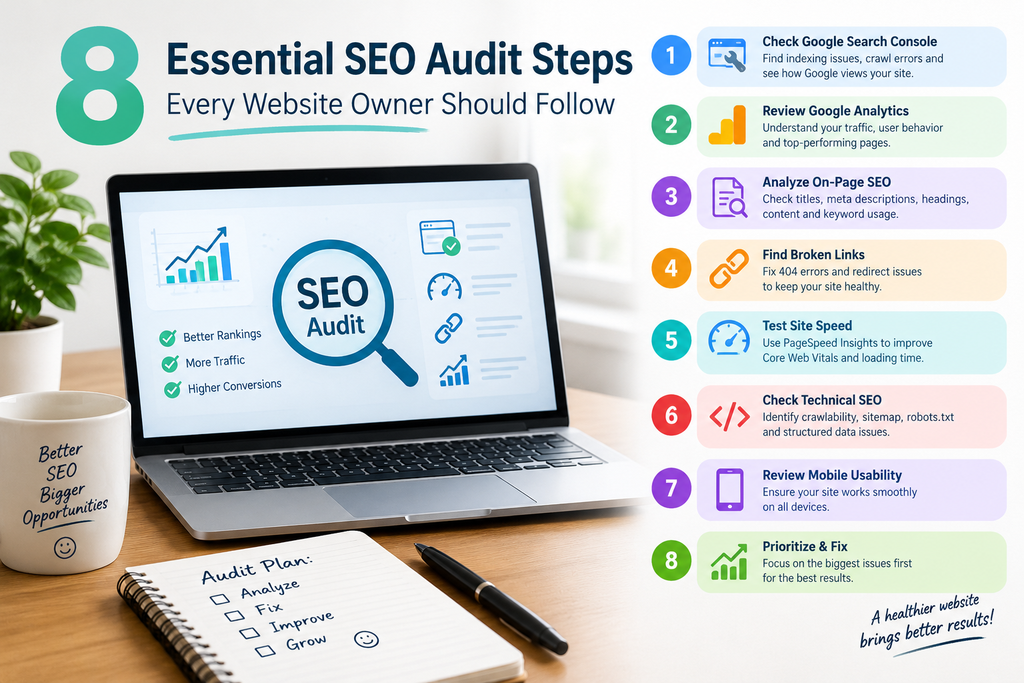
Most website owners guess at what’s holding their site back. They rewrite blog posts, buy tools, or chase backlinks without knowing what’s actually wrong. A clear set of SEO audit steps replaces the guessing with a plan.
I’m a freelance digital marketer based in Ernakulam, and I organize every website review around systematic SEO audit steps. Start with how Google sees the site, then move to content, then speed, and prioritize the fixes with the biggest payoff first. Here is that process.
Table of Contents
Why an SEO Audit Checklist Matters
A structured checklist of SEO audit steps stops you from fixing the wrong things. A site with slow pages and a site whose pages aren’t indexed at all need very different fixes. Without clear SEO audit steps, it’s easy to polish title tags on pages Google can’t even see.
A good audit answers three questions:
- Can Google find and index your pages?
- Do your pages match what people actually search for?
- Is your site fast and easy to use?
Step 1: Start With Google Search Console
This is always the first of my essential SEO audit steps. Search Console shows me Google’s view of my website, including indexing, impressions, clicks, and errors. It’s free and provides a close look at how Google sees my website.
Check these first:
- Pages report: which pages are indexed and which are excluded.
- Performance report: which queries and pages bring impressions and clicks.
- Manual actions and security issues: rare, but serious.
Step 2: Fix Indexing and Crawl Problems
This is the heart of a technical SEO audit. If a page isn’t indexed, it can’t rank, no matter how good it is.
Here’s a typical scenario. A service page is missing from search results. You open the URL Inspection tool and find a stray “noindex” tag, often left over from a staging site or added by a plugin setting. You remove the tag, request indexing, and wait for Google to recrawl.
How long does it take? It varies. Pages can reappear within a few days or take several weeks, so monitor Search Console rather than expecting an overnight result. Google explains how this tag works in its documentation on blocking indexing.
Also check for:
- Blocked pages in robots.txt
- Missing or outdated XML sitemaps
- Redirect chains and duplicate URLs
For larger sites, I run a crawler like Screaming Frog to catch these at scale.
Step 3: Examine Traffic in Google Analytics
Whereas the Search Console provides information on where the users found you, the Analytics provide information on what happened after they arrived on your page. Study the pages with much traffic, but high bounce rates or pages that bring traffic without conversions. These pages need optimization or improved call-to-action.
Step 4: Evaluate Keyword Targeting and Search Intent
This is the most common error I encounter, and the one that I would correct immediately if you could only make one change today.
Many websites go after high volume keywords regardless of why the searcher wants them. For example, look at this page on digital marketing services using the broad term “digital marketing.” Most people typing that want definitions or courses, not a service provider. Changing the focus to something specific, like “freelance digital marketer in Kerala,” matches the intent of people ready to hire.
To fix keyword targeting:
- Give each important page one primary keyword.
- Search that keyword and look at what ranks. Are they service pages, guides, or lists?
- Match the format and intent of what you find.
- Prefer relevant, lower-competition phrases over broad, crowded ones.
Step 5: Audit On-Page Elements
Once keywords are right, check the basics on each page:
- Title tags: under 60 characters, with the primary keyword near the front.
- Meta descriptions: 150–160 characters, written to earn the click.
- Headings: one H1 per page, with H2s and H3s that follow a logical order.
- Content: does it fully answer the search query without filler?
Step 6: Locate and Repair any Broken Links
Broken links annoy the visitor and use up valuable crawling time. Crawl your website, make a note of all the 404 errors you come across, and either repair the link or redirect it to the page that is nearest to it. Don’t forget to look at your internal links too.
Step 7: Test Speed and Core Web Vitals
Run your key pages through PageSpeed Insights. Google’s Core Web Vitals measure real user experience. Aim for these targets:
| Metric | What it measures | Good score |
| LCP | Loading speed of the main content | 2.5 seconds or less |
| INP | Responsiveness to clicks and taps | 200 milliseconds or less |
| CLS | Visual stability while loading | 0.1 or less |
Common optimization techniques: compressing images, deleting inaccessible scripts, and optimizing the hosting. While the speed of loading is one of the ranking factors, it is not that significant compared to the relevance, so it should not be prioritized over other critical issues.
Step 8: Prioritize Fixes by Impact
An audit that ends in a 60-item list helps nobody. Sort every issue by impact and effort:
| Priority | Type of issue | Example |
| 1 (fix now) | Blocks indexing | Accidental noindex tag |
| 2 | Wrong intent or keywords | Broad keyword on a service page |
| 3 | On-page basics | Missing meta descriptions |
| 4 | Technical polish | Redirect chains, minor speed gains |
Fix the top group before touching the rest. Re-check Search Console after a few weeks to see what changed.
Common Mistakes to Avoid
- Running a tool and trusting its score without reading the issues.
- Fixing minor technical warnings while important pages stay unindexed.
- Targeting keywords by volume alone.
- Auditing once and never again. I’d recheck every quarter.
Keep in mind that results vary by site size, industry, and competition. Tool recommendations also depend on your budget, and free tools cover most small-business needs.
FAQ
When do I perform a SEO audit for my website? Once in three to six months for all websites, but it is also recommended after a website redesign or migration.
Which SEO tools do I require for a technical SEO audit? The basic tools include Google Search Console, Google Analytics, and PageSpeed Insights. Screaming Frog can be useful for bigger sites.
How much time will an SEO audit take?
A small site can take a few hours. Larger sites take days.
Can I do an SEO audit myself?
Yes. Follow these SEO audit steps in order, and bring in a specialist only if you hit technical problems you can’t solve.
Conclusion
A regular SEO audit is essential for identifying website issues, improving search engine visibility, and delivering a better user experience. By following these 8 essential SEO audit steps, website owners can discover technical errors, optimize on-page elements, improve content quality, and monitor organic search performance. Consistent analysis and data-driven improvements help build a strong SEO foundation for long-term growth.
As a freelance digital marketer in Kochi, I believe that effective SEO starts with understanding a website’s specific challenges and implementing practical strategies that align with user search intent. Using tools such as Google Search Console, Google Analytics, and PageSpeed Insights can help identify opportunities for improvement and measure progress over time. A well-planned SEO audit is not just about fixing errors; it is about creating a reliable, user-friendly website that attracts relevant visitors and supports sustainable business growth.